

Description
Play and Convert AMR Files Easily
Overview
AMR Player is a lightweight desktop application designed for playing and converting AMR audio files. AMR, or Adaptive Multi-Rate, is a speech-focused audio compression format widely used in mobile communications and VoIP services. This software enables users to access and work with AMR files directly on their Windows and Mac systems without requiring additional plugins or software installations.
The tool supports playback of AMR, AMR-NB, 3GA, MP3, and WAV formats, offering a convenient solution for users who frequently encounter AMR files from mobile recordings, voicemail systems, or voice messaging apps. It also provides basic conversion functionality from AMR to WAV, allowing users to repurpose audio content for editing, archiving, or compatibility with other platforms.
Designed for simplicity, AMR Player allows direct file access from both local storage and Google Drive, streamlining workflows for users who manage audio files across cloud and local environments. The developer, SoftPas, has positioned the tool as a straightforward utility for professionals and casual users alike who need reliable access to AMR content without complex setup.
Key Features & Capabilities
- Native AMR Playback – Supports direct playback of AMR and AMR-NB files without external codecs or browser plugins.
- Multi-Format Support – Plays MP3, WAV, 3GA, and AMR files, making it a versatile audio utility for mixed audio libraries.
- AMR to WAV Conversion – Offers conversion from AMR to WAV format, useful for audio editing or archival purposes.
- Cloud Integration – Enables opening AMR files directly from Google Drive, enhancing accessibility for cloud-based workflows.
- Intuitive Playback Controls – Includes standard audio player features such as Play, Pause, Volume adjustment, and Playlist management.
- Browser-Based Accessibility – Functions within Chrome, Firefox, Safari, and Edge, ensuring broad compatibility across major platforms.
These features make AMR Player ideal for users managing voice memos, call recordings, or mobile-based audio content. The ability to convert AMR to WAV is particularly valuable for audio professionals needing higher-quality formats for further processing. The browser integration ensures minimal setup, allowing users to start playing or converting files immediately after launching the application.
User Interface, Workflow & Performance
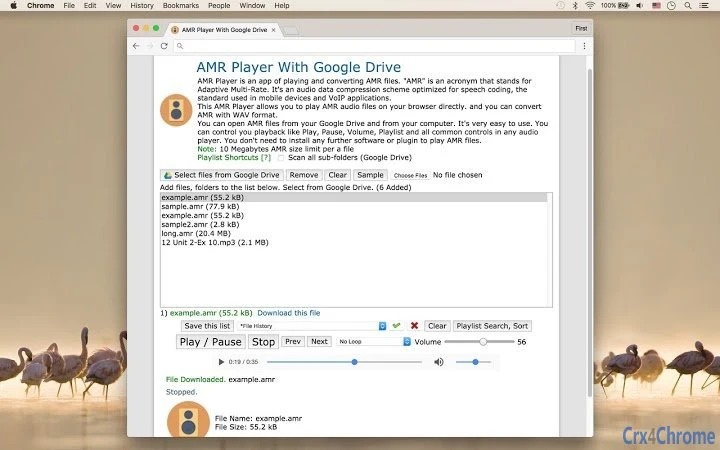
The user interface of AMR Player is designed with simplicity and functionality in mind. It features a clean layout with clearly labeled playback controls, a file browser, and a playlist display, enabling users to navigate and manage audio files efficiently. Navigation is straightforward, with minimal steps required to open a file from the local drive or Google Drive.
Workflow efficiency is enhanced by the tool’s direct file access and minimal configuration needs. Users can load multiple files into a playlist and manage playback seamlessly. The interface supports responsive design, adapting well to different screen sizes and resolutions.
Performance observations are based on general software behavior patterns. The developer did not specify resource usage details. However, given the application’s small size of 2.3 MB and focus on audio playback and conversion, it is expected to operate with low CPU and RAM consumption. Stability during playback and conversion tasks appears consistent with similar lightweight desktop utilities.
Compatibility & System Requirements
AMR Player is compatible with Windows and Mac operating systems, making it accessible to a broad user base across desktop environments. The software version is 1.0.0, with a file size of 2.3 MB, indicating a compact and lightweight installation.
Exact system requirements were not listed. The developer did not provide additional system requirements. Platform compatibility information is limited to the supported operating systems. Installation is straightforward, with no complex dependencies or prerequisites.
Pros and Cons
Pros
- Lightweight and fast to install (2.3 MB)
- Supports AMR, AMR-NB, 3GA, MP3, and WAV playback
- Converts AMR files to WAV format without extra tools
- Direct access to files from Google Drive
- Runs in major browsers: Chrome, Firefox, Safari, Edge
- Free to use with no licensing fees
Cons
- No support for AMR to MP3 conversion (only WAV)
- Limited format support compared to full-featured audio players
- No advanced editing or tagging features
- Exact system requirements not specified
- Browser dependency may affect offline usability
FAQ Section
Is AMR Player available for Windows and Mac?
Yes, AMR Player is compatible with both Windows and Mac operating systems.
Can I convert AMR files to MP3 using this software?
No, the current version only supports conversion from AMR to WAV. MP3 conversion is not available.
Does AMR Player require any plugins or additional software?
No, the application runs directly in supported browsers without requiring additional plugins or codecs.
Can I use AMR Player offline?
While the software functions within browsers, offline usage may be limited depending on the browser’s capabilities and whether the file is stored locally.
Is AMR Player safe to download and use?
Yes, the software is developed by SoftPas and is free to use. No malicious components were reported in the provided information.
Final Thoughts
AMR Player delivers a focused, reliable solution for users who need to play and convert AMR audio files on desktop systems. Its lightweight design, browser-based functionality, and support for Google Drive access make it a practical tool for both casual users and professionals working with mobile or VoIP audio content.
While it lacks advanced features like MP3 conversion or audio editing, its core purpose is well-executed with minimal friction. The free pricing model enhances its accessibility, and the straightforward interface ensures quick adoption.
For anyone regularly handling AMR files—whether from voicemail, mobile recordings, or voice apps—this tool provides a seamless, no-cost way to manage audio without complex setups.
Download AMR Player now
Guides & Tutorials for AMR Player With Google Drive App for Chrome
How to install AMR Player With Google Drive App for Chrome
- Click the Preview / Download button above.
- Once redirected, accept the terms and click Install.
- Wait for the AMR Player With Google Drive App for Chrome download to finish on your device.
How to use AMR Player With Google Drive App for Chrome
This software is primarily used for its core features described above. Open the app after installation to explore its capabilities.
User Reviews for AMR Player With Google Drive App for Chrome 0
No reviews found





